
As an affiliate marketer I am sure you have heard many times that it is a good idea to cloak your affiliate links…
But do you really know why?
In this post we will be giving you some of the reasons why you would want to cloak affiliate links and how to do it using a WordPress blog.
Cloaking Links And Its Benefits
The first and foremost benefit for any affiliate when wanting to cloak affiliate links is that the URL looks much more pleasing to the eye. Then you have those that say there is a very positive SEO benefit to having a much cleaner URL rather than some of the affiliate links which are automatically generated, and I would have to agree with that.
Another reason is to stop what is called link hijacking this used to happen with Clickbank affiliates but has been reduced considerable by their new hop-links. This is simply when a person wants to buy a product and changes the Clickbank hoplink to their own depriving the initial affiliate who did all the promoting of any commission.
OK Let’s Show You How To Cloak Your Affiliate Links
For this example I will be creating an affiliate link that is cloak for Keyword Elite 2.0 which I use and also promote as an affiliate… And I am assuming here, that you already know how to create a WordPress post in the dashboard of your site.
You now need to create a new post in your word press blog and place the title in as Keyword Elite 2.0 or whatever it is that you want to target remembering that this will be the URL as well of the page which is what you want the product name in the link you will be using to promote the product.
For SEO purposes it is always a good idea to have links coming off your site with the keywords in them…
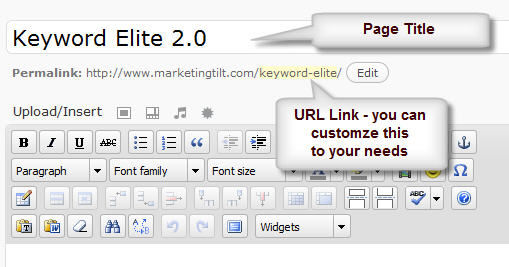
Now that we have created the page and decided on the URL link we need to scroll a little further down the WordPress Dashboard until you find where you can add another URL. This will be your affiliate link that you are going to be redirecting to.
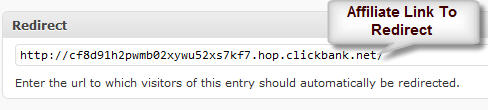
If you have used Clickbank before you will also notice that I am using their new hoplink as this will also help to hide your affiliate ID from anyone who has an issue with buying a product through an affiliate link.
OK We Are Nearly Finished Just Two More Optional Steps
If you scroll to the very bottom of the post you are editing you are going to see another function you can use to do one of two things…

You can choose to exclude this post in any features on your blog that will automatically create a listing for you on the site such as site maps, and even recent post widgets. However it is not really important as you want people to click on the link and go to the product page right, so why not leave it on your blog just make sure to complete any required fields so that it appears in widgets as a real post.
Make Sure You “Nofollow” Your Links
There are two ways you can do this with your affiliate links, the first being with your robots.txt file like this… And why do you need to do it simply for this reason what is known as the “thin affiliate site penalty” which can be applied to your site by Google™, so it is better to take no chances and simply add the “nofollow”.
The first one is for GoogleBot
User-agent: Googlebot
Disallow: /keyword-elite/ (this is the page URL) that is why it is recommended to place this in a separate category so you can add all your affiliate links to that category and simply “nofollow” everything in that category like this using the /category/*, the asterisks will “nofollow” everything in that directory.
For all the other robots you need to simply do this…
User-agent: *
Disallow: /keyword-elite/ or if it is a /category/
You can also just a do an inline search to find out a lot more information about how to block the search engine spiders from indexing certain parts of your site, or you can use plugins that are free to download from the WordPress site such as the Google Sitemap Generator.
However there is an easier way to do this directly from your dashboard using a WordPress plugin called Script Manager from Semiologic a very good SEO configured WordPress theme.
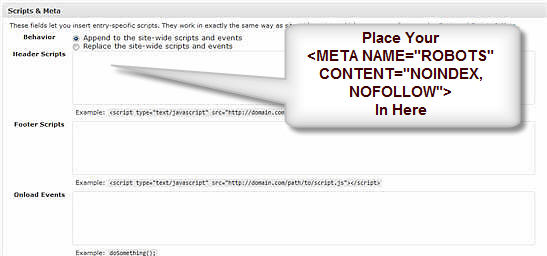
This makes the complete process much easier to do without the worry of editing your robots.txt file or having to manually add “nofollow” commands within your blog.
And for those that find this to hard to do there is one more solution you can use with a program called GoTryThis where you can cloak affiliate links within a separate hosted dashboard which even tells you how many links and what IP addresses are clicking those links which is what we use on our blog here.
GoTryThis is an industry class marketing tool that helps to manage all of your affiliate campaigns much easier and without having to be competent with editing any html code.
These are just some of the ways you can go about cloaking your affiliate links, there are many others and if you would like to add your own suggestions and comments for our readers please do so.
Recommended Affiliate Link Cloaking Plugins
Pretty Link Free Edition – Track, Share and Brand your affiliate links easily…
GoTryThis- The best affiliate link cloaking plugin online right now…
The Redirection plugin is also a free option that can help you cloak / mask affiliate links. It also can monitor for broken links and they can be corrected with a 301-redirect.
Hi lorenzo
This looks like a useful WordPress plugin to have if you are seeing a lot of 404 errors in your webmaster tools account.